Failure to properly document lockout tagout procedures kills. Not figuratively—literally. OSHA reports that improper machine servicing causes 10% of all manufacturing fatalities. At the heart of every successful energy control program? A well-executed lockout tagout documentation form.
This isn’t paperwork for the sake of compliance. It’s a lifeline. When a technician opens a pressurized hydraulic line or services a conveyor motor, the documentation form is the last legal, procedural, and physical checkpoint before work begins. Skip it, mislabel it, or falsify it—and you risk severe injury, regulatory penalties, or shutdowns.
Let’s break down what a real-world LOTO documentation form does, how to build one that works, and where most companies fail.
What Is a Lockout Tagout Documentation Form?
A lockout tagout documentation form is a standardized, written record used during maintenance or servicing to verify that energy sources have been isolated, locked, and tagged. It’s not just a checklist—it’s a legal document that confirms:
- Which machine or equipment is being serviced
- What energy sources are present (electrical, pneumatic, hydraulic, chemical, thermal)
- Which employees applied locks and tags
- When the lockout began and ended
- Verification that zero energy state was achieved
This form bridges the gap between theory and action. While a lockout/tagout procedure tells you how to isolate a machine, the documentation form proves it was done correctly.
Why Documentation Matters Beyond Compliance
Yes, OSHA 1910.147 requires documented procedures. But treating this as a box-ticking exercise is dangerous. The real value of documentation lies in three areas: accountability, verification, and traceability.
Accountability: Who Did What, and When?
Imagine three technicians working on a packaging line. One locks the main disconnect. Another isolates the air supply. A supervisor verifies the zero energy state. Without documentation, confusion arises. Who removed a lock early? Who skipped a step?
A proper LOTO form logs each person’s name, role, lock ID number, and time of application. This creates clear ownership.
Verification: Proof of Zero Energy State
The form includes a section where the authorized employee tests the machine—trying to start it, checking for residual pressure, measuring voltage. This step is non-negotiable.
Example: A maintenance tech servicing a hydraulic shear confirms the pump is off, locks the valve, but forgets to bleed residual pressure. The form should include a field like: ✅ Verified no hydraulic pressure remains: _______ (initials, time)
If that step is blank, the form fails. So does the safety process.
Traceability: Audit Defense and Incident Review
When OSHA shows up after an accident, they don’t want stories. They want records. A complete LOTO documentation trail shows due diligence. It proves training, adherence, and verification—even if an unexpected injury occurs.
Key Components of an Effective LOTO Documentation Form
Don’t use generic templates from free PDF sites. They’re often incomplete or overly complex. Build yours around these non-negotiable elements.
1. Equipment Identification
- Machine name, ID number, location
- Specific components being serviced (e.g., “Drive motor on Line 3 filler”)
Mistake to avoid: Vague labels like “Production machine.” If you have five identical mixers, which one?
2. Energy Source Inventory List every energy type involved:
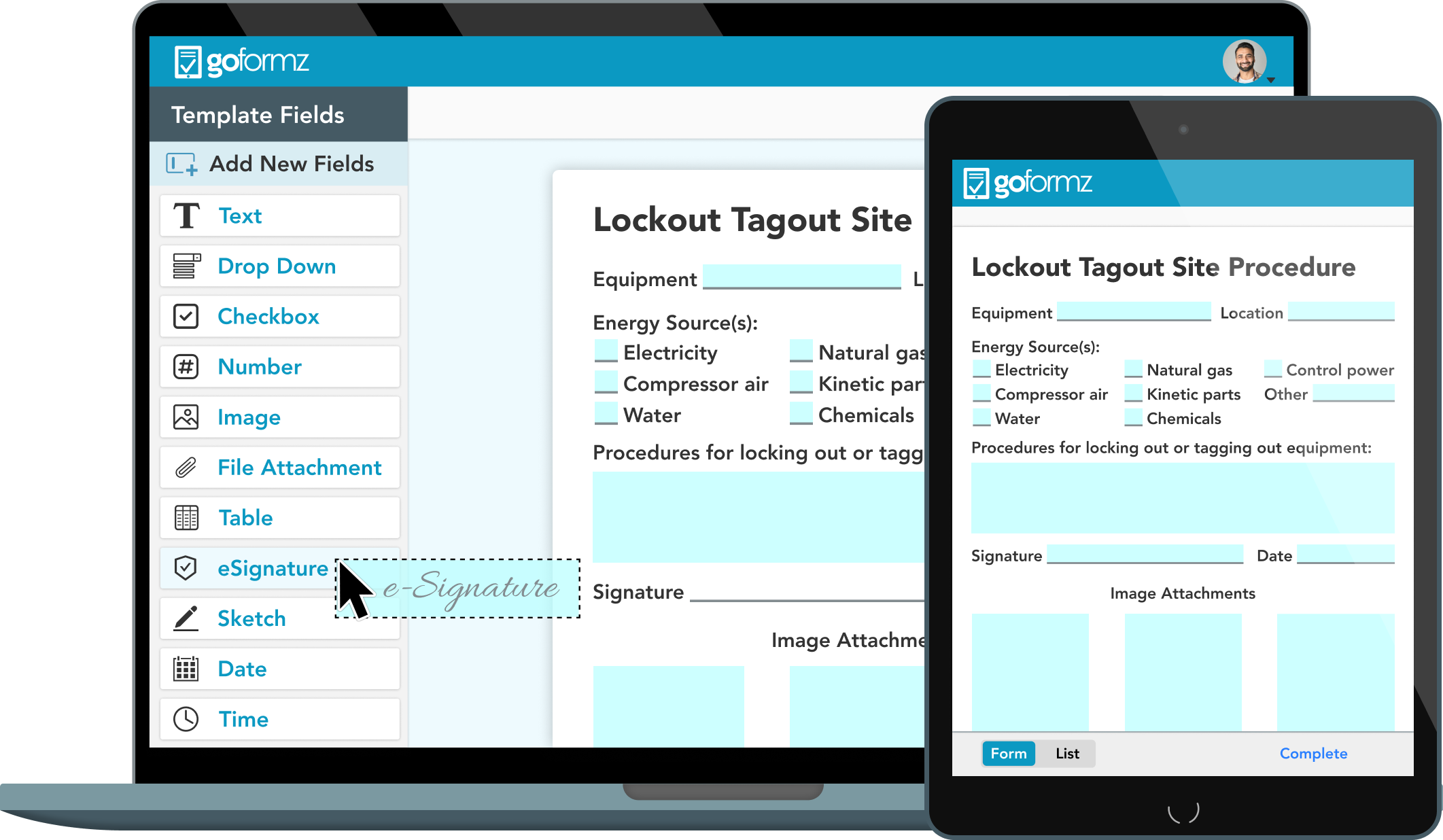
- Electrical (voltage level)
- Pneumatic (valve location)
- Hydraulic (reservoir, lines)
- Chemical (feed lines, tanks)
- Thermal (steam lines, heated jackets)
Use case: A boiler maintenance form must list steam, gas, and electrical feeds—not just “power off.”
3. Authorized Personnel Log Each employee applies their personal lock and fills in: - Name - Employee ID - Lock ID number - Time applied
Workflow tip: Use color-coded locks by department. Maintenance uses red, operations blue. Makes visual audits faster.
4. Lock Application & Verification Checklist A step-by-step grid:
- [ ] Power disconnected at source
- [ ] Isolating valve closed and locked
- [ ] Residual energy relieved (bleed, block, drain)
- [ ] Test for zero energy state performed
This section should be initialed or signed at each step.
5. Supervisor Sign-Off Final verification that all steps are complete and safe to proceed.
6. Duration and Removal Authorization
- Start time of lockout
- Expected completion time
- Who will remove locks (often the same person who applied them)
Critical rule: Locks must be removed by the individual who installed them—unless a formal removal procedure is followed (e.g., shift change with documented handoff).
Common LOTO Documentation Mistakes (And How to Fix Them)
Even experienced teams make errors. Here’s what goes wrong—and how to stop it.
Mistake 1: Using One Form for Multiple Machines Problem: A single “universal” form covers everything from CNC mills to forklifts. Fix: Create machine-specific forms. A lathe has different energy points than a robotic arm. Customize.
Mistake 2: Allowing Blank or Unsigned Fields Problem: A tech skips the verification step because “it’s obvious.” Fix: Treat blank fields as violations. Use carbon-copy forms or digital tools that enforce completion.
Mistake 3: No Training Documentation Link Problem: The form doesn’t reference employee training records. Fix: Add a field: “Employee trained on LOTO for this equipment: □ Yes (Record #______) □ No”
OSHA will ask—be ready.
Mistake 4: Failing to Update Forms
After Equipment Changes Problem: A machine is retrofitted with new controls, but the LOTO form still references old disconnects. Fix: Review all LOTO documentation after any equipment modification. Assign ownership—e.g., Maintenance Supervisor.
Digital vs. Paper LOTO Documentation: What Works Best?
Paper forms are still common—but digital is gaining fast. Here’s how they compare.
| Feature | Paper Forms | Digital Systems |
|---|---|---|
| Real-time verification | No | Yes (photos, GPS, timestamps) |
| Audit trail | Manual filing | Automatic cloud backup |
| Completion enforcement | Skippable fields | Required fields, no bypass |
| Accessibility | On-site only | Mobile access, offline mode |
| Integration | None | Links to CMMS, training databases |
Best use cases: - Paper: Small operations, infrequent maintenance, low regulatory scrutiny - Digital: High-risk environments, multi-site fleets, companies with CMMS integration
Example: A food processing plant using paper forms reduced LOTO errors by 40% after switching to a tablet-based system with photo verification of lock placement.
5 Real-World LOTO Documentation Tools You Can Use
Not all tools are equal. Choose based on complexity, team size, and risk profile.
- Lockout Tagout Pro (App)
- - Mobile app with pre-built templates
- - Photo capture, e-signatures, PDF export
- - Best for: Field service teams needing portability
- EHS Insight (Software Platform)
- - Full EHS suite with LOTO module
- - Integrates with training records and incident reporting
- - Best for: Mid to large manufacturers
- LockoutWorks (Web-Based System)
- - Drag-and-drop form builder
- - Real-time dashboards for supervisory review
- - Best for: Companies with variable equipment
- FaciliWorks (CMMS with LOTO Add-On)
- - Ties lockout docs directly to work orders
- - Prevents scheduling until LOTO is verified
- - Best for: Maintenance-heavy facilities
- Printable OSHA-Compliant Templates (PDF)
- - Free or low-cost downloadable forms
- - Basic but customizable
- - Best for: Small workshops or startups testing process
Choose tools that enforce discipline—not just convenience.
How to Audit Your LOTO Documentation Process
You’re not compliant just because forms exist. Audit quarterly using this checklist.
- [ ] All active equipment has a current LOTO form
- [ ] Forms are machine-specific, not generic
- [ ] Every completed form has all fields filled, signed, dated
- [ ] Lock IDs match physical locks on site
- [ ] Training records align with personnel listed on forms
- [ ] No duplicate or missing form numbers
- [ ] Removal procedure followed (same person, no unauthorized removal)
Pro tip: Do a “reverse audit.” Pick a completed form and re-walk the procedure. Did it match reality?
Final Thoughts: Don’t Let the Form Become a Formality
A lockout tagout documentation form is only as good as the culture behind it. The best-designed form fails if workers see it as bureaucracy. The weakest template works if everyone treats it as a life-saving ritual.
Build forms that are specific, enforceable, and integrated into daily workflow. Train relentlessly. Audit consistently. And never—ever—let a single form be signed before the last lock is in place.
Start today: Pull three recent LOTO forms. Review them against this guide. If any are incomplete, unclear, or incorrect—stop work until they’re fixed.
Because when the machine powers on, the form is the only thing standing between safety and catastrophe.
How do you fill out a lockout tagout documentation form? Begin by identifying the equipment and energy sources. List each authorized employee applying a lock, specify isolation points, verify zero energy state, and obtain supervisor sign-off before beginning work.
What should be included in a LOTO documentation form? Essential elements include equipment ID, energy source types, personnel names and lock IDs, step-by-step isolation checklist, verification of zero energy, and sign-offs from all involved parties.
Who is responsible for completing the LOTO form? Authorized employees performing the service are responsible for completing the form, with final verification and sign-off typically required by a supervisor or safety officer.
Can digital forms replace paper LOTO documentation? Yes, digital forms are acceptable and often preferred if they ensure completeness, provide secure records, and support real-time verification and audit trails.
How long should LOTO documentation be kept? OSHA does not specify a retention period, but industry best practice is to keep records for at least one year, or longer if part of an incident investigation or regulatory audit.
Is training required before filling out a LOTO form? Yes, only authorized employees who have completed lockout tagout training can complete or sign LOTO documentation forms.
Can multiple people use the same LOTO form? Yes, one form can cover multiple employees working on the same equipment, but each must apply their own lock, sign the form, and verify their isolation steps.
FAQ
What should you look for in Lockout Tagout Documentation Form Essentials? Focus on relevance, practical value, and how well the solution matches real user intent.
Is Lockout Tagout Documentation Form Essentials suitable for beginners? That depends on the workflow, but a clear step-by-step approach usually makes it easier to start.
How do you compare options around Lockout Tagout Documentation Form Essentials? Compare features, trust signals, limitations, pricing, and ease of implementation.
What mistakes should you avoid? Avoid generic choices, weak validation, and decisions based only on marketing claims.
What is the next best step? Shortlist the most relevant options, validate them quickly, and refine from real-world results.